
Qatar’s economy keeps moving fast. Construction crews work across Lusail and Msheireb; retail teams cover long mall hours in Doha, and hospitality staff run split shifts through peak season. Managing all of that with paper sheets or basic spreadsheets is slow, and it costs real money. That’s where the time series comes in.
Time Trace is a workforce management software built for companies that want clean, accurate records of who worked, when they worked, and how that time turns into pay. It brings employee time tracking, employee scheduling software features, and workforce monitoring software into one place. No juggling tools. No end of month confusion.
This guide walks through how time track works, what makes it a fit for Qatar’s market, and how it answers the questions most managers ask before they switch systems.
What is workforce management software?
Workforce management software is a platform that helps businesses plan, track, and pay their people. At its core, it covers four jobs:
- Scheduling shifts and rosters
- Recording work hours and attendance
- Monitoring productivity and location where needed
- Feeding accurate data into payroll
A good workforce management platform replaces the mix of Excel files, WhatsApp messages, and paper punch cards that many companies still use. It also keeps records that satisfy labor rules under Qatar’s Law No. 14 of 2004 and later amendments. This sets clear expectations for working hours, overtime, and record keeping.
According to indicative industry figures often cited by workforce analysts, companies that move from manual timesheets to digital time tracking cut payroll errors by 20 to 40 percent. They also reduce time spent on payroll admin by up to 70 percent. Those numbers show up quickly on the bottom line.
Why Qatar businesses need Time Trace?
Qatar’s labor market is diverse. A single company might employ engineers, drivers, security staff, and office workers, each on different contracts and shift patterns. You can add in the Wage Protection System (WPS) requirements set by the Ministry of Labor, and the paperwork gets heavy.
Time log was built with that reality in mind. It handles:
- Multiple shift patterns, including night shifts and rotating rosters.
- Bilingual interfaces for Arabic and English speakers.
- WPS friendly payroll exports.
- Get tagged clock in and clock out for site-based teams.
- Records that hold up during ministry audits.
For enterprises operating across the GCC, this matters. One system, one source of truth, less risk.
Core features of Time Trace
Here’s what the platform actually does day to day.
Employee time tracking
Staff clock in through a mobile app, a web browser, or a shared kiosk tablet. Every entry is time stamped and stored. Managers see live status, such as who’s on shift, who’s late, and who’s on break. This is employee time tracking without the guesswork.
GPS enabled employee time tracking software
For field teams, drivers, and site staff, Time log records location now of clock in. It confirms the person was at the site before their hours count. This is useful for the construction, facility management, and delivery of businesses.
Employee scheduling software
Build weekly or monthly rosters in a drag and drop view. Copy last week’s schedule, swap shifts, or send an open shift to the whole team. Staff get notified on their phones. Fewer no shows, fewer last-minute calls.
Attendance automation
The system flags late arrivals, early departures, missed punches, and overtime as they happen. Managers approve or correct entries in a few taps. That’s attendance automation done right such as less admin and more visibility.
Digital timesheets
Timesheets fill themselves in from clock data. At period end, they’re ready for review, approval, and export. No copying rows between spreadsheets.
Payroll tracking and integration
Time log is an employee time tracking software with payroll integration. Approved hours, overtime, and allowances flow straight into your payroll run. It exports in WPS SIF format, which keeps you aligned with Qatar Central Bank guidelines.
Workforce monitoring software features
For office and remote teams, the time series offers optional productivity monitoring, such as active hours, application use, and idle time. Employers decide what to track, and staff see what’s collected. This supports employee performance tracking without crossing into close observation.
How does time tracking improve productivity?
Tracking time changes behavior in three ways.
First, it makes work visible. When a team knows hours are counted, casual overruns and long breaks drop. A study often referenced by HR analysts suggests companies lose 4 to 6 hours per employee per week to “time theft” and unrecorded downtime. Even trimming that in half is massive.
Second, it gives managers real numbers. Instead of guessing why a project ran late, they can see who spent time on what. That leads to better estimates next time.
Third, it protects staff. Accurate records mean overtime gets paid correctly, and disputes end with data, not arguments.
How can businesses track employee working hours?
There are three common methods, and the attendance management system supports all of them:
Mobile clock in:
Staff use the time log app on their phone. Best for field and remote workers.
Web browser clock in:
Ideal for office staff who work from a desk.
Kiosk mode:
A shared tablet at a site entrance. Staff clock in with a PIN, face scan, or QR code. Good for factories, warehouses, and construction gates.
Every method feeds the same central record, so managers see one view no matter where the team is.
How do you automate employee attendance?
Automation happens in layers. First, staff self-record their arrival through their chosen method. Second, the system compares that entry to their schedule and flags anything unusual. Third, rules you set like general deadlines, overtime thresholds, and holiday pay apply automatically. By the time the manager looks, most of the work is done. That’s an automated employee attendance management system in practice.
Comparison: Time and Attendance solution vs Common Alternatives
Here’s how time and attendance solution lines up against the tools many Qatar businesses still rely on.
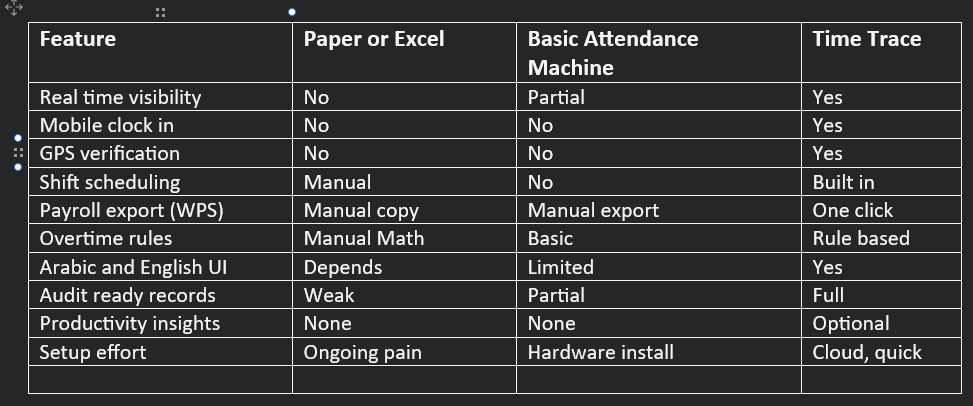
The gap widens as the headcount grows. For a company with 20 staff, spreadsheets are just about work. At 100 or 500 staff, the same approach breaks down.
Time tracking software for enterprises in Qatar
Larger organisations have extra needs, such as role-based access, multiple business units, custom reports, and single signs. This workforce management solution supports all of that. It also offers open APIs for integration with HR systems, ERP platforms, and finance tools. For companies planning wider digital projects, Aiimone provides enterprise integration and platform engineering work that keeps Time Trace connected to the rest of the tech stack.
Employee attendance software pricing
Pricing questions come up early, and they should. Most workforce management platforms charge per active user per month, with tiers based on features. The employee time tracking solution follows the same model, with volume discounts for enterprise accounts and options for annual billing. For an exact quote, request a demo through the employee time tracking solution website, which involves pricing that depends on team size, features, and whether onsite kiosks are part of the setup.
What does a rollout look like?
A typical Time log rollout runs in four steps:
Setup:
Import staff data, set shift patterns, and define pay rules. Usually a few days.
Pilot:
Run one team or one site for two weeks. Fix anything odd.
Full launch:
Roll out to all sites. Train managers and staff.
Review:
After 30 days, check the numbers. Adjust rules and reports.
Most companies see a full return within three to six months, driven by lower payroll errors, less admin time, and fewer overtime disputes.
Closing thoughts
Qatar’s workforce is growing, and the rules around how it’s managed keep tightening. Companies that still run on paper or basic spreadsheets carry hidden costs, like payroll mistakes, compliance risk, and hours lost to admin. Time Trace resolves those problems with one clear system for time tracking, employee scheduling, and payroll ready records. For any business that wants to stop guessing about hours and start managing them properly, it’s worth a serious look.